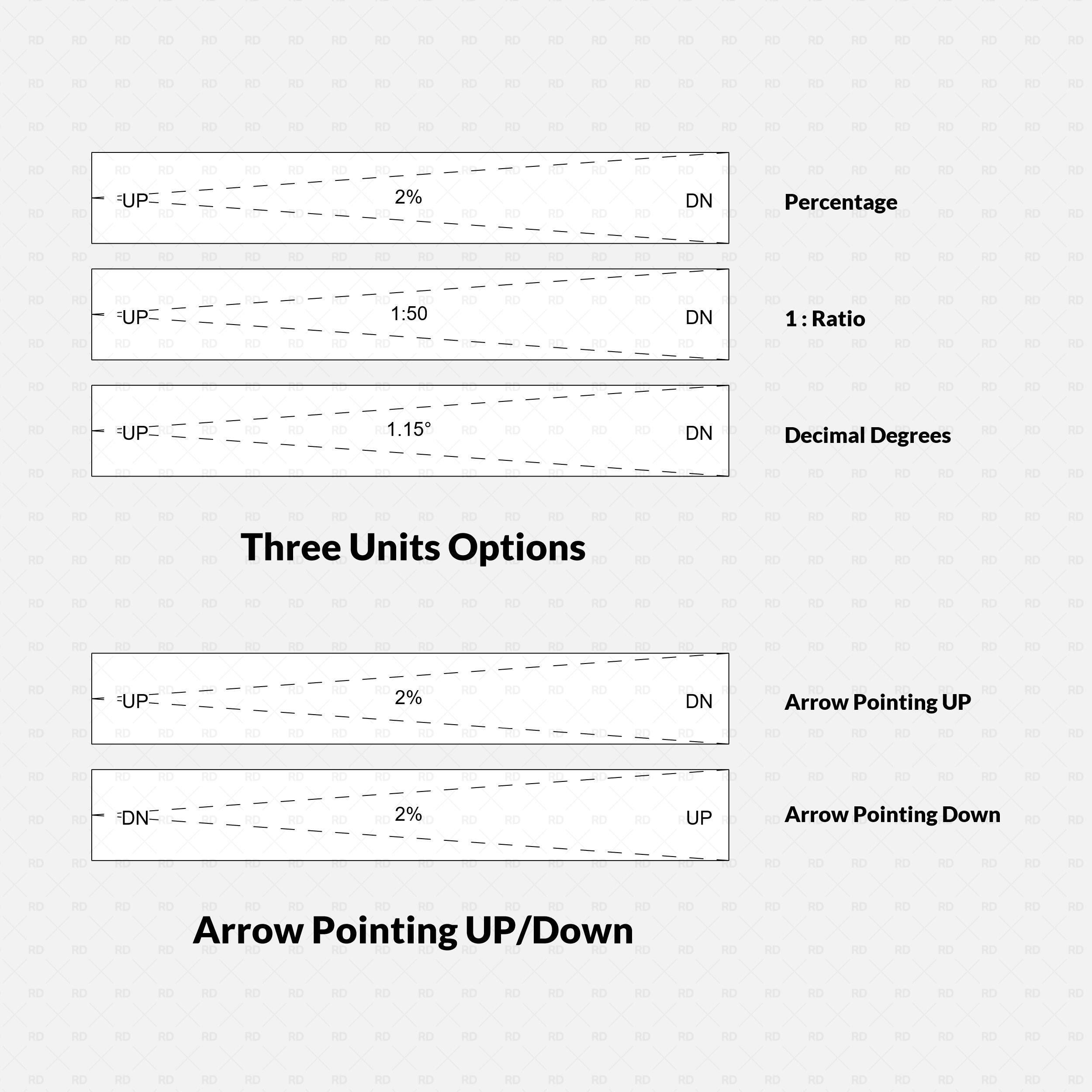

Revit Ramp Graphic & Calculator (2D Detail Item)

Regular price$0.00
/
License
  • Are you a Student? Select the Educational Use.

The essential 2D Detail Item that draws standard-compliant ramp graphics and calculates your Rise/Run math—no 3D modeling required.
  • Digital Download
  • Revit Version: 2020
  • Created by: RD Studio
  • Pack Categories: Detail Item
  • Units System: Metric and Imperial

Free Products
Our Free Educational Use License is specifically designed for academic purposes. Under this license, RD Studio's free products can be utilized in educational settings, including classroom activities, academic projects, and other learning initiatives. When using a product, you are required to grant full credit to RD Studio, with an active link for online versions. Additionally, if a project using our product is showcased on social media, you must credit RD Studio with an active tag to our profile. Please note that commercial use of these products under this license is strictly prohibited.

Educational Use
Products labeled "Educational Use" are exclusively for student use in academic settings. These products are intended to support educational development and must not be employed for any commercial purposes.

Commercial Use
With the purchase of a Commercial Use License, you are authorized to use the product in commercial projects without the need to attribute RD Studio. However, the standard prohibitions on reproduction, distribution, and resale, as detailed in the "Strictly Forbidden" section, remain applicable.

University Multi-User License
The University Multi-User License is tailored for educational institutions, allowing up to 30 users, including students and teachers, to use our products for academic purposes. This license facilitates the use of our products in educational environments, such as classroom learning, academic research, and student projects. Redistribution or commercial use of these products under this license is not allowed.

Strictly Forbidden
You are not allowed to reproduce, distribute, copy or sell the contents of RD Studio at any circumstances. Products can’t be sold without being part of a bigger project or work combining RD Studio digital products with other graphics, modeling or digital elements. Also, you are not allowed to use products from RD Studio in similar or any competing services.

Zip Folders
To unzip a ZIP folder, right-click to select Extract Here.

How to Load Revit Families
1. Open Revit, go to the Insert Tab and Press on Load Family
2. Choose the downloaded family from your computer

For more information please visit our download and install instructions page.

The all-in-one Detail Item that handles your slope graphics and your math.

Draft Ramps Faster. Calculate Slopes Instantly.
Stop breaking your workflow to open a calculator app or model complex 3D geometry just for a simple plan detail. This sophisticated 2D Revit family combines professional drafting standards with a powerful built-in slope calculator.

Ideal for Schematic Design & 2D Detailing.
Need to show a ramp on a floor plan or detail view but don't want to mess with the native 3D Ramp tool? Drag and drop this Detail Item, stretch it to fit, and you are done.


Why this is better than the native Spot Slope:

Revit's native Spot Slope tool is useful, but it fails in two key areas for this specific workflow:

  1. It doesn't provide the graphics: The native tool is just a text tag, it creates a small arrow and a number, but it doesn't draw the ramp itself. You are still stuck manually drawing the dashed slope lines, boundary box, and start/end indicators. Our family draws the entire graphic representation instantly.
  2. It requires a 3D element: The native tool must have a 3D floor or ramp to host it. If you are working in a Drafting View, or if you haven't modeled the complex 3D geometry yet, the native tool allows for nothing. Our solution is 100% independent.
Comparison between the RD Studio Revit ramp family, which draws full dashed slope lines and boundary graphics, versus the native Revit Spot Slope tool, which only provides a simple text tag without the essential drafting lines.

One Family, Global Standards.

Whether you are in the US, Europe, or Australia, this family adapts. Toggle instantly between:

  • Percentage: (e.g., 8.33%)
  • Ratio: (e.g., 1:12 or 1:14)
  • Decimal Degrees: (e.g., 4.76°)

Key Features:

🧮 The "Scratchpad" Calculator

Includes a unique "Analysis" section in the instance properties. Input your Run and desired Slope to instantly see the required Rise.

(Note: The calculator provides the math data you need; you then simply drag the graphic handles to match!)

📐 Smart Graphics

  • Dynamic Stretching: Drag handles for Length and Width.
  • Direction Control: "UP" and "DN" labels with correct arrow orientation (Dot-to-Head).
  • Clean Layouts: Toggle boundary lines, slope lines, and text labels on/off individually. Move text labels to avoid clashes.


What’s Included:

  • 📦 Metric Family (.rfa): Pre-set for mm and meters.
  • 📦 Imperial Family (.rfa): Pre-set for inches and feet.
  • 📄 Revit Version: Compatible with Revit 2020 and newer.
  • 🎨 Font: Uses system default (Arial) for easy integration into your office template.

Add this essential tool to your library and never calculate a slope manually again.


Please make sure your Revit version is compatible with the product version

  • Revit Version: 2020
  • The download folder includes 2 Revit Families

Pack Categories:

  • Detail Item

Units System:

  • Metric
  • Imperial

RD Studio is a creative BIM factory that creates high-quality Families for Revit and Dynamo Scripts with a focus on innovation and functionality.

Check our About Page Here